I wanted to upgrade my Lenovo P500 which uses an Intel E5-2600V3 series processor to a V4 due to the better power efficiency. Most (or some) motherboards that supported v3 cpus in other brands and products only needed a bios update to support v4 cpus. Based on a thorough visual inspection I compared the motherboard from my p500 to p510 boards online - the only difference is the model "SCORPIUS V1.0" whereas the p510 is V1.1.
I used a 3.3v modded CH341A programmer to directly flash a modified p500 bios with v4 support. This is what I did to mod and flash the bios:
-
You are responsible for any damage. Follow steps 1, 6, 7, and 8 if you just want to flash, or read the whole guide if you don't trust my modded bios.
-
First make a backup of your original bios with the CH341A (here is mine), I use IMSProg to read and write the EEPROM. I recommend, checking the file in a hex viewer to make sure it is not all 0s and making two reads to compare the checksums. Also this will change your bios serial number, model, and other info; if you want to restore later this take some pictures.
-
Then download the p510 bios with the efi shell utility from Lenovo's website, named "s00j372usa.zip", then extract it and get "IMAGES00.ROM".
-
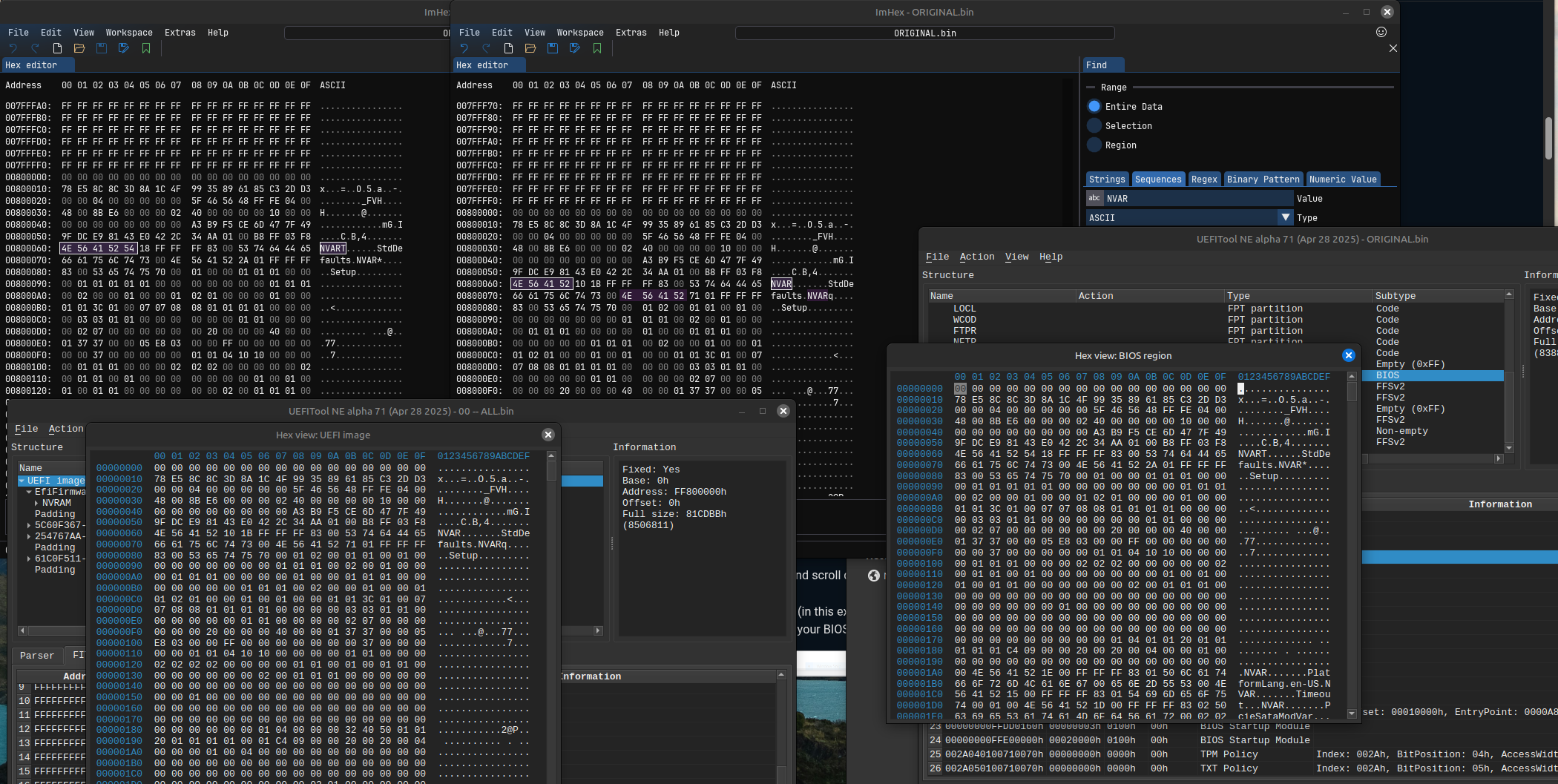
Using BIOSUtilities extract "IMAGES00.ROM" to a directory and look for the file "00 -- ALL.bin" (here is mine), use UEFITool and make sure it looks like this (left):

-
In ImHex or another hex editor, open the file "00 -- ALL.bin" and copy everything, then in your backup file made in step 1, replace the bios region (at address 800000) with the copied data. In the below image, the ImHex window on the right contains the modified original bios, notice that the hex at 800060 now reads NVAR instead of NVART:
-
Take the modified original bios (here is mine, MD5: "1528278cca1b04e49ed650f4d6eef02d") and using the CH341A flash it onto your p500 motherboard.
-
Power on the system, verify the bios version, then set parameters using the tools in the lenovo efi shell utility, in the EFI shell, AFU folder you can run:
- AMIDEEFIx64.efi /SU auto | to set the system UUID.
- AMIDEEFIx64.efi /IVN "your vendor name" | to set the vendor name.
- etc, there is a help menu so you can see all the options.
-
Then you should be able to install a V4 cpu!
Here are some photos of the process:

 After flashing there is missing information in the UEFI
 I am the bios vendor now
 Replacing the CPU with an E5-2680V4